Updates
Latest updates and improvements to Joely.
Workflows That Run Themselves #
Draw how a ticket should be handled once, and every ticket after it handles itself.
New features
- Automations, drawn instead of configured — Drop the steps on a canvas, connect them, switch it on. Nothing to code, and an unfinished workflow waits as a draft.
- React to what actually happens — A ticket opened, a reply posted, a status moved, a product linked. Each one can start a workflow.
- Ask your customer a question, inside the ticket — Choices as buttons or a dropdown. The workflow waits for the answer, then continues down the branch they picked.
- Let your assistant answer on cue — The AI replies the moment it makes sense, with an instruction written for that answer alone. Your approval setting still applies.
- Stop guessing which product a ticket is about — Your customer picks from your catalog, and their answer links it to the ticket. It only asks when it doesn't already know.
- Hand the ticket to the right person — Assign it, set its priority, link or unlink products, schedule its closure. Chain a few and a ticket routes itself.
- Tell Discord, or tell your own tools — An embed in a channel, a direct message to everyone involved, or a webhook to your own service.
- Write it once, they read it in their language — On the Team plan, the messages a workflow posts go out in the language your customer opened the ticket in.
- Know exactly what ran, in one sentence — What the workflow did, and what it declined to do and why. The raw values stay one click away.
Improvements
- Your auto-assign rules become workflows in one click, and they can do far more than assign from there.
- Every plan gets the whole builder, every trigger and every action. What changes with your plan is how many times your workflows run each month.
- Workflows watch each other's work safely: a message one posts can start another, and built-in safeguards stop a chain that would run in circles.
- Your imported pages and pasted notes now have the same scope filter as your facts, so a shop with per-product documentation can narrow to one in a second.
- CSAT, AI, Commands, Automations and Support hours are grouped together in the menu and sorted alphabetically, on desktop and on mobile alike.
- An integration needing your attention now shows up on the mobile bar, not just in the sidebar you don't open on a phone.
- Notifications appear at the top of the screen instead of covering the buttons at the bottom right.
Fixes
- A screenshot no longer decides the language of an AI reply. Attach an English game window to a French ticket and the answer stays French.
- Reopening one of your messages to edit it no longer rewrites what you typed. File paths and lists come back exactly as you wrote them.
- The AI no longer answers about a product an automation had just removed from the ticket.
- A ticket closed automatically now updates its badge everywhere right away, without a refresh.
Knowledge That Scales #
Teach your AI once and let it answer for a whole category, a whole shop, or every product you pick.
New features
- One answer, every product it applies to — An installation guide doesn't belong to a single package. Attach it to as many products as you want, to a full category, or to an entire shop in one click. Add a new product to that category later and it inherits the knowledge on its own, nothing to re-import.
- Categories bring their subcategories along — Teach something at the top of your catalog and every product filed underneath is covered, however deep it sits.
- Pick the scope while you import — The scope selector is now built into every import and re-sync window, so a page lands where it belongs the first time instead of being fixed afterwards. Automatic package detection is still one switch away.
Improvements
- Opening a ticket no longer eats into your monthly AI replies. The counter now tracks what you actually asked for.
- The "Recent quota usage" table lists only what counts against your plan, so what you read matches the gauges above it.
- Editing an AI draft before you send it is recorded as a good suggestion, not a rejection, so your AI quality stats reflect reality.
- "Fix with AI" stays available on closed tickets, for that last thank-you message.
- Typing
/docin a reply now finds your documentation links right away. - Hovering the suggestion list in the composer is finally visible in dark mode.
Fixes
- Assignee avatars no longer vanish from a ticket when its status or priority changes.
- A Tebex store with no webstore address configured now says so, instead of showing a bare "https://" in your store settings.
- The "unsaved changes" bar on your package visibility settings stops appearing on a page you never touched.
Tickets That Know The Product #
Link every package a customer bought to their ticket, and get the right documentation without leaving the conversation.
New features
- One ticket, every package — A customer who bought three of your products no longer needs three tickets. Link all the packages they own to a single conversation and keep the whole story in one place.
- The right doc, right in the ticket — Once a package is linked, its documentation pages appear in the ticket sidebar. Drop a doc link into your reply from the composer in a couple of keystrokes, instead of digging through your own website.
- Two-factor on every sign-in — If you turned on two-factor authentication, it now applies when you sign in with a connected account too, not just with your password.
Improvements
- Picking a Tebex package is the same everywhere in the dashboard now, and the list loads instantly instead of waiting on your store.
- Links you write in a reply stay exactly as you typed them, instead of being turned into something you didn't ask for.
- Tables show that they're loading instead of flashing "nothing here" before your data arrives.
Fixes
- Pasting text into a reply continues your sentence instead of breaking it onto a new line.
- Dates now follow the language you picked, not your browser's.
- Link previews no longer show up twice in a message.
A Faster Ticket Workspace #
Your ticket list, filters and side panel now work as one. Plus AI rewriting and translation right where you type.
New features
- Your filters follow you everywhere — Set your filters, sort and saved presets once on the ticket list, and the side navigation shows exactly the same tickets. No more re-filtering every time you open a ticket.
- See who's on the ticket — The customer sidebar shows every staff member who can see the ticket, and hovering an avatar tells you when they were last active. You know instantly whether someone is already on it.
- Translate your reply as you write — Write in your language, send in theirs. Translation is built into the reply box, and one click brings your original draft back.
- Rewrite your knowledge content with AI — Rephrase or translate any knowledge article straight from the editor, without leaving the page.
- Share mod files in tickets — Customers can attach GTA and FiveM mod files, archives, configs and assets directly to a ticket, so you stop chasing files through third-party links.
- Slash commands that are yours — The custom commands you create stay in your own menu instead of cluttering everyone else's.
- Sign in with Cfx.re, every time — A second sign-in path kicks in automatically when the usual one is unavailable, so customers get into the portal instead of hitting a dead end.
Improvements
- Unread replies now show as a count on the ticket avatar, so you can see at a glance where the conversation moved.
- Ticket badges update live as things happen, no refresh needed.
- Watch your website import page by page as it runs, instead of staring at a spinner.
- Import failures now tell you what went wrong instead of quietly disappearing.
- Your portal ticket list shows which package each ticket is about.
- Pages across the app load faster after each update we ship.
Fixes
- Undoing an AI rewrite in the reply box brings back your draft instead of losing it.
- The "pause AI when a staff member replies" setting now sticks.
- Clearing a date in your support hours no longer breaks the page.
- The unread badge on the browser tab updates on its own, without a reload.
- Long assignee names no longer overflow the ticket sidebar.
- Background jobs survive a restart and can't be picked up twice.
AI Knowledge, Rebuilt #
A rebuilt AI knowledge engine, a playground to test it, and a faster ticket workspace for your team.
New features
AI
- A rebuilt knowledge engine — The AI now answers using your documentation's exact wording instead of rewritten summaries. Answers are more accurate, closer to your docs, and the AI always finds something relevant to work from.
- Test your AI before your customers do — The new Test Knowledge playground lets you ask the AI real questions and see exactly how it answers from your knowledge base, no ticket required.
- Your knowledge, finally organized — A new Documentations tab shows every imported site as a browsable tree: search it, preview what was imported from each page, and see at a glance which pages are indexed, importing, or need attention.
- Teach the AI by pasting text — Drop any text straight into your knowledge base, edit it whenever you want, all from a dedicated "From text" tab. Perfect for policies, FAQs or notes that don't live on a website.
- One-click re-sync — When your docs change, re-sync a whole site, a folder or a single page. Joely checks what actually changed and only re-imports that. You review a clear before/after diff.
- The AI knows your packages — Imported docs are matched to your Tebex packages automatically, so the AI can suggest the right product and ask the customer to confirm with a simple Yes/No, right in the ticket or in their Discord DMs.
- Give your assistant a face — Upload an avatar, pick an icon and color, or link an image. Your AI now shows up with your brand's identity.
- A graceful handoff — When the AI can't answer from your knowledge base, it tells the customer a team member will take over, in the customer's own language.
- Steer AI drafts with /ai — Type /ai in the reply box with your instructions and get a draft written the way you asked.
- Refine just the text you highlight in the reply box — Select any part of your message and let the AI rework only that, leaving the rest untouched.
Tickets
- Jump between tickets instantly — A new navigation panel sits beside the conversation, so you can move to the next ticket without going back to the list.
- A workspace that fits you — Drag to resize the ticket list, chat and details columns exactly how you like them.
- See who's already on it — Live presence chips show which teammates are viewing the same ticket, so nobody answers twice.
- Close on your schedule — Choose your own default delay for scheduled ticket closures.
Dashboard
- A cleaner dashboard — The dashboard adopts the portal's full-width header for a lighter, more consistent look, with the documentation now one click away from the sidebar.
Improvements
- The AI imports dashboard is now a control room: approve finished imports in one click, skip or cancel jobs in bulk, and clear the whole queue when you change your mind.
- Import notifications now tell you exactly which page they're about.
- Sitemap imports handle up to 100 pages, and you can start from any page of a site. Joely finds the sitemap for you.
- Web imports run in parallel, so large documentation sites finish faster.
- Ticket cards now show which Tebex package the ticket is about, and any message can be copied from its context menu.
Fixes
- Cancelled imports no longer show up as failed, and deleting a source now cleans up everything it created.
- The AI no longer slips into the wrong language mid-reply.
- Order history shows product images again, every time.
- Saving your support hours no longer asks for an AI upgrade.
- Ticket modals fit properly on phone screens, and styles no longer break while navigating the portal.
The New Portal #
A redesigned support portal, a mobile-first ticket chat, and full control over which packages your customers see.
New features
Portal
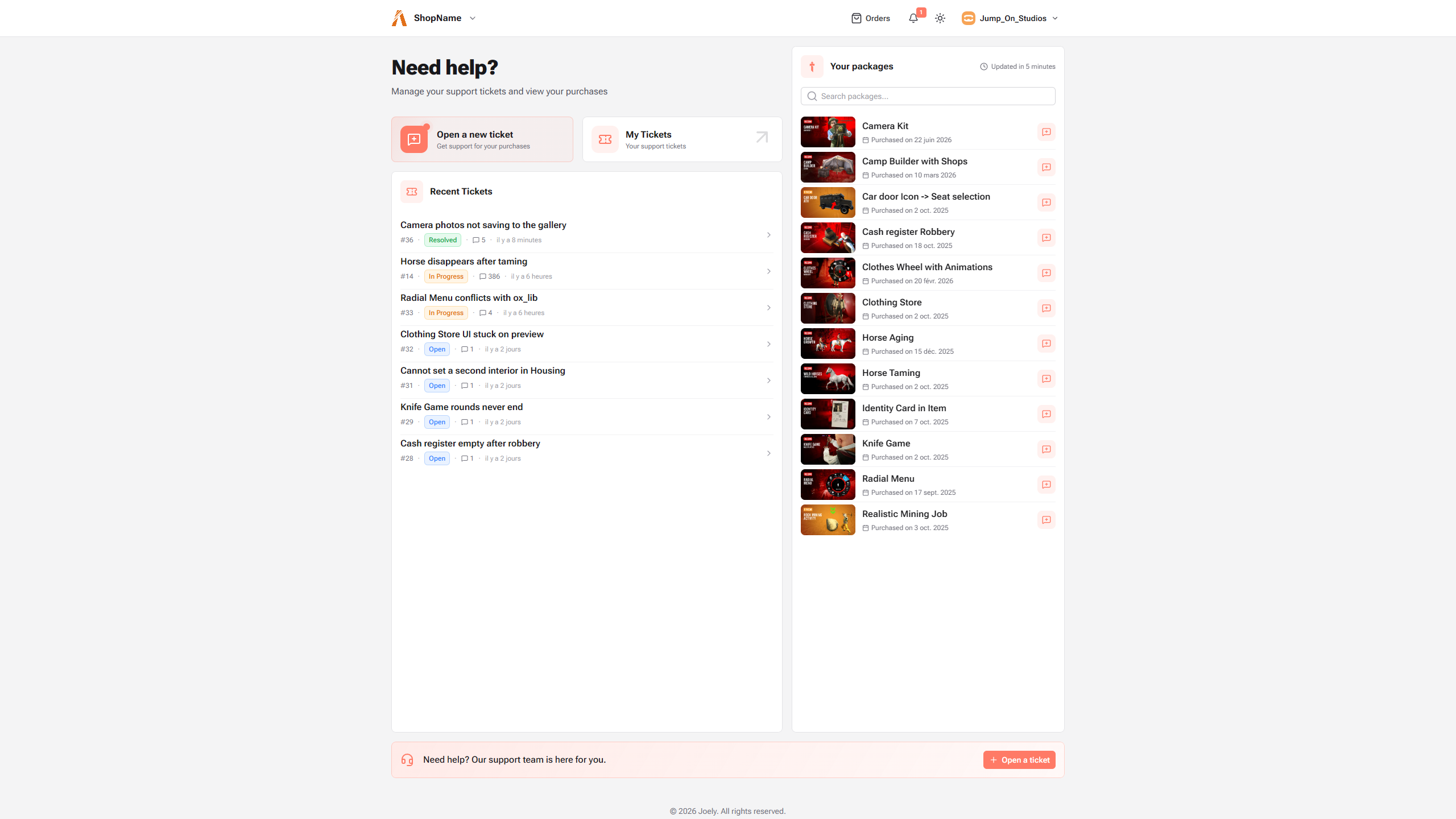
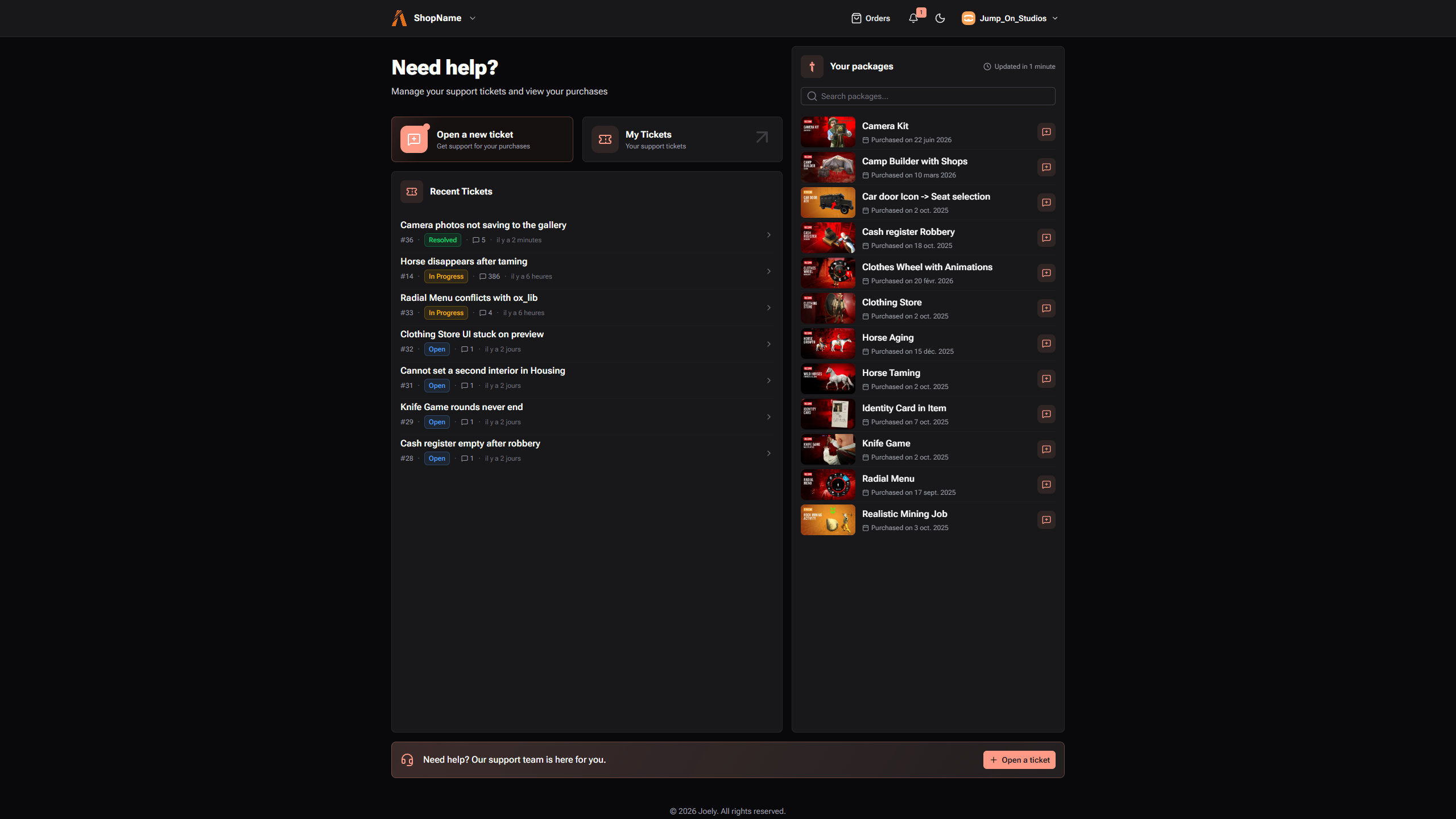
- Completely redesigned — Your customers land on a cleaner, faster support portal: a help-first home page, a prominent "open a ticket" button, and redesigned packages, orders and tickets pages that all share one consistent look.
- Switch between shops instantly — Customers who buy from several shops can jump between them from the new portal header, or find any shop by name with the new search.
- Package images everywhere — Your Tebex packages now show their store artwork across the portal, with instant placeholders so lists never pop or shift while loading.
- A ticket chat built for phones — On mobile, the conversation resizes smoothly above the keyboard, and ticket details open in a full-screen panel you can swipe away.
Dashboard
- Choose which packages appear — Hide Tebex packages by category, by store, or everywhere at once. Your customers only see what's actually for sale.
- Edits reach Discord too — When your team edits a reply, the customer's Discord DM is updated to match, so nobody acts on an outdated answer.
- Export your AI knowledge base — Plus projects can download everything the AI has learned as JSON or CSV, ready for audits or backups.
- Swipeable ticket details on mobile — The same phone-friendly chat and swipe-away details panel as the portal, for your team on the go.
Improvements
- Ticket tables are now yours to shape: filter by unread, sort any column, and resize or reorder columns to fit your workflow.
- Tickets open faster and the portal renders instantly on first visit instead of showing spinners.
- A refreshed look across the dashboard: new typography, brighter cards, and a dark mode that finally gets elevation right.
- Your shop's logo now appears on the Tebex settings page, with store details refreshing live.
Fixes
- Deleting an AI import now also removes the unverified facts it created, so abandoned imports no longer leave clutter behind in your knowledge base.
- Inline code and command variables in replies stay exactly as you typed them.
- The "new messages" marker now lands where you can see it when opening a busy ticket.
- Dark mode reaches every corner, including page scrollbars.
- Assorted portal layout fixes: no more double scrollbars, awkward date wrapping, or misaligned lists.
Better AI & Faster Panel #
Smarter, more honest AI answers, and a dashboard and portals that open the moment you click.
New features
- Cancel coupons & gift cards from a ticket — When a customer's coupon or gift card needs to go, revoke it right inside the conversation. No switching tabs, no digging through Tebex.
- See promo status in the portal — Your customers now see whether their coupon or promo is live, right in their portal sidebar.
- Sort tickets by activity — Order your ticket list by message count to spot the busiest, most demanding conversations first.
- CSAT ratings land in Discord — Every satisfaction rating a customer submits is posted straight to your Discord channel, so your team sees feedback the moment it arrives.
- Edit AI suggestions before you send — Want to tweak an AI reply before it goes out? Drop it straight into your composer, adjust the wording, and send it on your terms.
- Find shops as you type — On the portals page, start typing a shop's name and matching shops appear instantly, no full search needed.
Improvements
- Tickets open instantly — Conversations, sidebars and the reply box now load on first paint instead of waiting on a spinner, so opening a ticket feels immediate.
- Snappier portal — The portal home and ticket pages render up front, so customers reach their tickets and purchases without a loading flash.
- Smoother conversations — No more layout jumps when link previews load or when you hover a message, and the chat scrolls cleanly the moment it opens.
- More trustworthy AI answers — The assistant now stays quiet when it genuinely doesn't have an answer instead of padding a reply, and pulls from more of your knowledge base to answer accurately.
- Readable inline code as you type — Code snippets keep their backticks visible while you write, so you always see where the code starts and ends, and a stray backtick is easy to remove.
- Pasted text keeps its formatting — Paste formatted text into the message box and it comes through clean instead of as raw markdown.
Fixes
- Blank lines between paragraphs are kept in chat messages, so formatting reads the way you wrote it.
- The notification badge in your browser tab stays in sync with the in-app bell.
- The package picker now remembers when you pick "Other", so it stops asking every time.
- Promo and Discord cards on portal tickets now render correctly from the first paint.
AI Sources & Localized Alerts #
See exactly where AI answers come from, and get ticket alerts in your own language.
New features
- See where AI answers come from — When the assistant answers from your knowledge base, it now shows clickable links to the exact source pages, right under the reply. Your customers see them too, so they can double-check the answer in one click.
- Get pinged the moment a ticket is yours — Assigned to a ticket? You get a Discord DM, in your own language, so nothing slips through the cracks.
- Stay on top of internal notes — When a teammate leaves an internal note on a ticket you handle, you now get a heads-up DM. Customers never see these.
Improvements
- Notifications in your language — Every Discord alert — new replies, satisfaction surveys, connection checks — now arrives in the language you chose, across English, French, German, Italian and Spanish.
- One Discord, several logins — Use the same Discord account to get notifications for more than one portal login.
- No more double pings — Already reading the ticket? We skip the duplicate DM.
- More of the app in your language — Extra notification, mention and satisfaction labels that were stuck in English now follow your language setting.
Fixes
- Tidier ticket list — Removed a duplicate "no tickets" message on the ticket list.
Your Keys, Your Server #
Keep your Tebex keys on your own server, teach your AI your whole site at once, and support customers in any language.
New features
- Self-hosted Tebex bridge — Run a small bridge on your own server and your Tebex API keys never leave it. Joely only ever receives the purchase data it needs, with everything else stripped out before it's sent. Full control, less data shared.
- Teach your AI your whole site at once — Point the AI at your documentation sitemap and it imports every page in one go, instead of adding them one at a time. It even matches the right Tebex package to each page automatically. Get a Discord DM when your import is ready to review.
- Talk to every customer in their language — Team-plan staff can now read any conversation translated side-by-side, on both the dashboard and the customer portal.
- Copy a whole conversation in one click — Grab the entire ticket exchange instantly to paste into Discord, notes, or anywhere else, from both the staff and portal views.
- Collect files with custom fields — Add a "files" custom field so customers can attach uploads right when they open a ticket.
- See who joins or leaves a ticket — A system message now appears whenever a participant is added to or removed from a conversation.
Improvements
- A clearer onboarding — The setup wizard has been rebuilt with helpful side cards, a celebration when you finish, and a flow that's much harder to get lost in.
- Branded Discord messages — DM notifications now carry your project logo and render formatting properly.
- All your alerts in one place — Discord DM updates are now folded into your main notifications card.
- A fresh documentation site — The public docs got a cleaner, full-width layout with an on-page table of contents to jump around faster.
- Color-coded ticket statuses — Every ticket status now has its own distinct color, so you can read your queue at a glance.
- Optional Tebex private key — Connecting Tebex no longer requires a private key; add it only if you want to, and remove it anytime.
- Custom support-hours banner — Set your own support-hours message and icon, ideal for teams spread across time zones.
Fixes
- Lists now continue correctly when you press Enter in the reply editor, and pasting into backticks turns text into inline code.
- The right author name now shows on every message in conversations with multiple customer participants.
- Pressing Enter adds a new line in the portal's create-ticket fields instead of submitting early.
- Finishing onboarding no longer bounces you back into the wizard.
- Dates no longer display incorrectly on the portal when a value is missing.
Auto-Updating Tickets & AI Vision #
Close a GitHub issue or ship a release and your tickets update themselves — and the AI now reads screenshots in messages.
New features
- Tickets that follow your code — Link a ticket to a GitHub issue and let your support queue keep itself in sync. Close the issue when the fix is done and the ticket moves to a new "Awaiting Release" status; publish your release and it flips to Resolved, letting the customer know their fix is live. No more flipping statuses by hand while you're busy shipping — turn it on per project in your GitHub settings, and we check your setup is wired correctly before enabling so it never silently does nothing.
- AI that reads your screenshots — When a customer attaches a screenshot, an error message, or a receipt, the AI now looks at the image while drafting its reply — so its answers reflect what's actually in the picture, not just the text. Available on Plus.